










EV Charging Service at DEWA Stations: Guide to Green Mobility


With over 400 charging stations and 740+ charge points across Dubai, DEWA makes it easy for EV owners to power up conveniently. This guide covers everything you need to know about DEWA’s EV charging services, including how to use them, costs, locations, and more.
What is DEWA’s EV Green Charger Initiative?
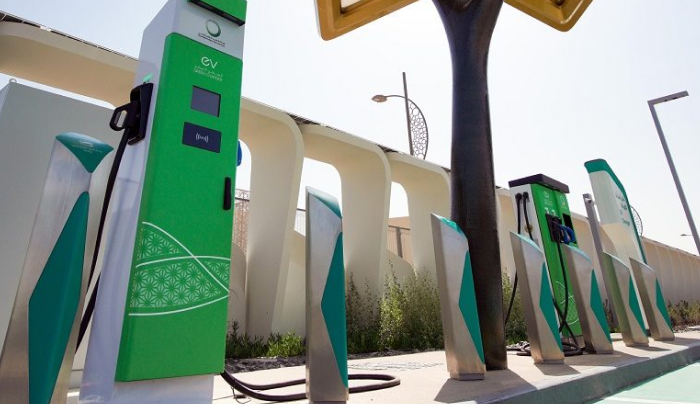
Launched in 2015, DEWA’s EV Green Charger Initiative supports Dubai’s vision to become a global leader in sustainability and smart cities. It aims to promote eco-friendly transportation by building a robust network of electric vehicle charging stations across the emirate. This initiative aligns with the UAE’s goals to reduce carbon emissions by 10 million tonnes and have 50% of vehicles on UAE roads be electric by 2050.
DEWA’s network has grown from 100 stations in 2015 to over 400 by 2025, with plans to reach 1,000 stations by the end of the year. These stations are strategically placed in malls, airports, petrol stations, residential areas, and more, making charging accessible for all EV drivers.
How to Use DEWA’s EV Charging Stations
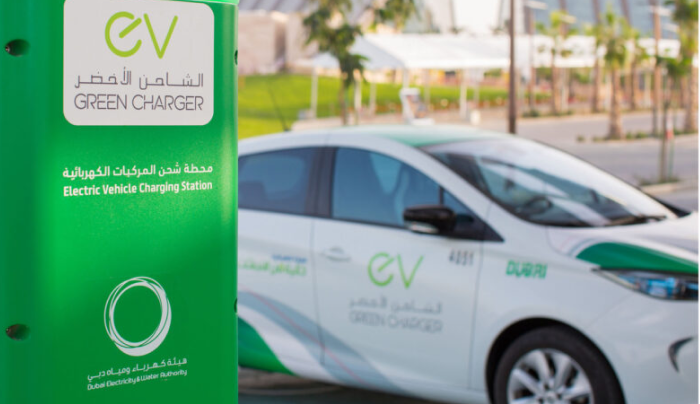
Whether you’re a registered user or a guest, here’s how it works:
For Registered Users
- Register Your EV: After registering your vehicle with Dubai’s Roads and Transport Authority (RTA), DEWA automatically creates an EV account. You’ll receive a welcome email with account details, a payment link for the security deposit (AED 500), and EV Green Charger card delivery fee (AED 20).
- Activate Your Account: Pay the fees to activate your account. Your EV Green Charger card will be delivered within three working days.
- Charge Your Vehicle:
- Use the DEWA Smart App to scan the QR code at the charging station.
- Alternatively, use your EV Green Charger card to start charging.
- Follow on-screen instructions to begin and end the session.
For Guest Users
No registration? No problem! DEWA’s Guest Mode lets you charge without an account:
- Scan the QR code on the charging station using your smartphone camera or the DEWA Smart App.
- Select a charging package based on charger type and duration.
- Plug in the cable, press “Start Charging,” and monitor the status (a blue light indicates charging).
Tip: Always follow DEWA’s instructions to avoid damaging your vehicle or the charger. In emergencies, call 991.
Types of DEWA EV Chargers
DEWA offers various charger types to suit different needs:
Charger Type |
Power Output |
Charging Time |
Socket Type |
Best For |
|
Wall-Box |
22 kW AC |
2–4 hours |
Type 2 Socket |
Home charging |
|
Public Charger |
2 x 22 kW AC |
2–4 hours |
Double Type 2 Socket |
Public areas like malls |
|
Fast Charger |
43 kW AC / 50 kW DC |
20–45 minutes (80% charge) |
Type 2, ChadeMO, Combo CCS |
Petrol stations, quick stops |
|
Ultra-Fast Charger |
150 kW DC |
10–20 minutes |
Type 2, Combo CCS |
Newer EV models, rapid charging |
How to Activate Your DEWA EV Account
Below are the four main ways to activate your DEWA EV account:
1. Via RTA Integration
- Process: After registering your EV with Dubai’s Roads and Transport Authority (RTA), DEWA automatically sends a welcome notification via email and SMS. This includes:
- EV account details
- Security deposit information
- EV Green Charger Card delivery fees
- Payment link and charging guidelines
- Next Steps: Pay the security deposit and delivery fees through the provided link. Your account is activated upon payment confirmation.
2. Via DubaiNow App
- Steps:
- Log in to the DubaiNow App using UAE Pass.
- Navigate to “Driving” > “EV Registration and Charging” > “Create New EV.”
- Enter required details and pay the security deposit (if applicable) and card delivery fees.
- Confirmation: Receive a receipt and on-screen confirmation with a reference number. Your account is activated, and you’ll get a message with account details and charging instructions.
3. Via DEWA’s Digital Platforms
- Steps:
- Log in to the DEWA website (www.dewa.gov.ae) or DEWA Smart App using UAE Pass or DEWA ID.
- Go to “EV Account & Charging Card Management” > “Create EV Account.”
- Submit vehicle and personal details, then pay the security deposit (if applicable) and card delivery fees.
- Confirmation: Get a receipt and confirmation with a reference number. Your account is activated, followed by a message with account details and charging instructions.
4. Via DEWA’s Customer Care Centre (IVR)
- Eligibility: Only for EVs already registered with RTA.
- Steps:
- Call DEWA’s Customer Care Centre IVR helpline (04-601-9999).
- Select “EV Account & Charging Card Management” > “Create EV Account.”
- Complete verification and provide required details.
- Receive a payment link for the security deposit and delivery fees.
What is the Costs of Charging at DEWA Stations
As of January 2025, free charging for non-commercial EV users has ended, and DEWA now follows a fee-based structure per UAE Cabinet Decision No. 81 of 2024. Here are the rates:
A. Security Deposit:
- Individual (Non-Commercial) and Business (Commercial): AED 500/-
- Government: Exempt from security deposit
B. Delivery Charges:
- Individual (Non-Commercial) and Business (Commercial): AED 20/- (plus VAT)
- Government: AED 20/- (plus VAT)
C. Consumption Fees:
- Individual (Non-Commercial), Business (Commercial), and Government:
- AC Charging: AED 0.7/kWh + VAT
- DC Charging: AED 1.2/kWh + VAT
Guest Mode Charging:
Guest Mode, offered by the Dubai Electricity and Water Authority (DEWA), allows electric vehicle (EV) users who are not enrolled in the "EV Green Charger" initiative to charge their vehicles. Choose your desired charging duration from the provided estimated values and pay the applicable fees.
Card Delivery and Charging Process
Registered Users:
- Activation: Charging access via QR code is available within 1 hour of registration.
- EV Green Charger Card: Delivered within 3 working days via courier.
- Charging: Locate stations using the DEWA Smart App, DubaiNow App, or platforms like Google Maps. Start charging via the app, QR code, or card. Fees are added to your DEWA Green Bill.
Guest Users:
- Charging: Scan the QR code at a Green Charger station, verify details, select charging duration, and pay. An invoice is emailed after the session.
- Access: Immediate charging without an account, with fees based on consumption.
Where to Find DEWA EV Charging Stations
DEWA’s 400+ charging stations are located at:
- Malls: Dubai Mall, Mall of the Emirates
- Petrol Stations: ENOC, ADNOC
- Airports: Dubai International Airport
- Residential Areas: New communities and complexes
- Other Public Areas: Hospitals, government offices, and transit hubs
You can locate chargers using:
- DEWA Smart App or website
- Digital maps like Google Maps, Apple Maps, or PlugShare
- Ride-share platforms like Careem
For a detailed map, visit DEWA’s EV Green Charger locations page or use apps like ChargeMap, which lists 70+ stations in Dubai.
FAQs
1. How do I know when my EV is fully charged?
Check the charger’s display or your vehicle’s battery indicator. Both show when charging is complete.
2. Can non-residents use DEWA chargers?
Yes, use Guest Mode by scanning the QR code at the station. No registration is needed.
3. What documents are required to register with DEWA?
- UAE residents: Emirates ID and vehicle license
- Non-residents: Passport and vehicle license
4. How can I deactivate my EV Green Charger account?
Apply for deactivation via DEWA’s website, Smart App, or Customer Care Centre (04-6019999).
5. Are there any free charging promotions?
Free charging ended in January 2025, but DEWA may offer discounts during sustainability campaigns. Check their website or app.